Soft Block vs Hard Block: What Actually Keeps You Off a Site
A soft block notices you drifting and lets you decide: a reminder, a pause, a nudge. A hard block takes the decision away: the page is simply gone. Neither wins alone. Hard blocks trigger the forbidden fruit effect and get uninstalled within weeks, while soft blocks get ignored at 11 pm when your willpower is spent. What actually keeps you off a site is escalation: soft first, hard when the nudge stops working.
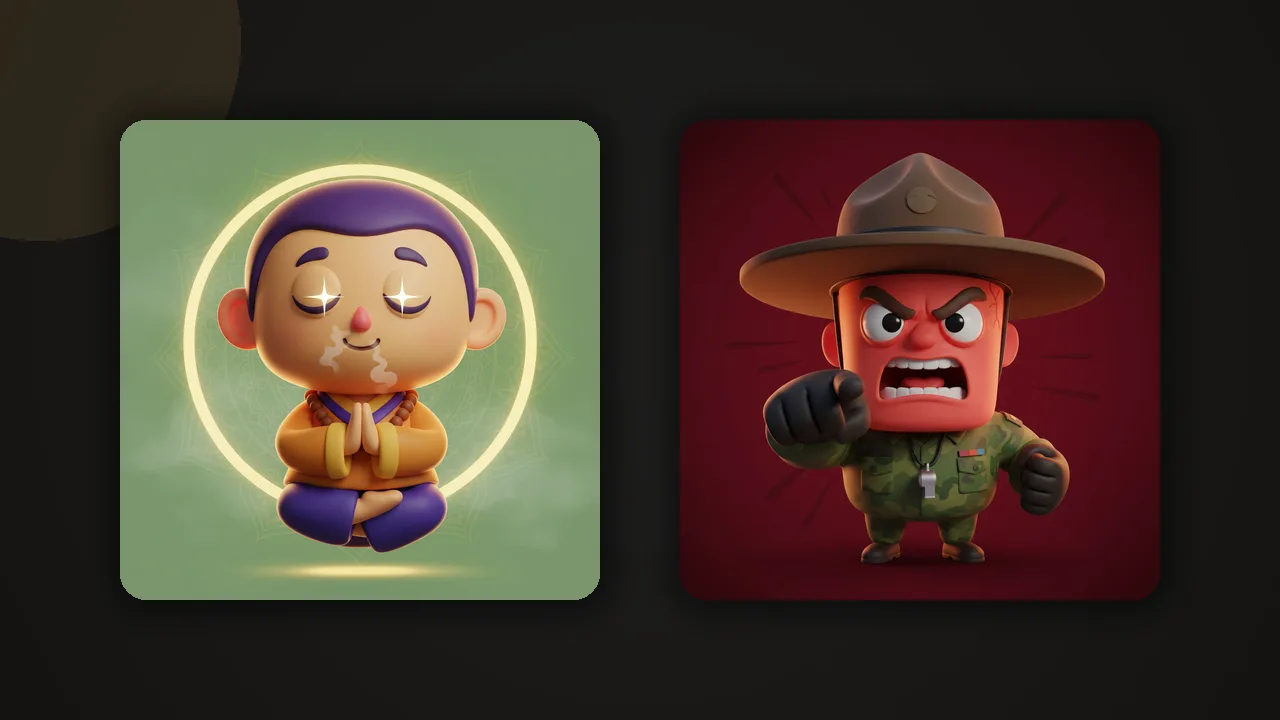
What a soft block is
A soft block interrupts without forbidding. The site still loads, but something steps between you and the autopilot: a reminder card, a deliberate delay before the page opens, a message asking whether this is really what you meant to do. The extension one sec built its whole product on that pause. In ZalipOff, soft mode means a small card appears in the corner of the screen where one of 12 coach characters reacts to where you are: the zen master raises a calm eyebrow, the drill sergeant is less subtle.

The point of a soft block is not to stop you. It is to convert an unconscious visit into a conscious choice. A surprising share of distraction is not decided at all: your fingers typed the URL while your brain was still compiling. A nudge catches exactly that.
Soft blocks also generate honest data about your own behavior. When the card appears for the fourth time in an hour, that is information no Sunday time report delivers with the same punch, because it arrives at the moment of the habit instead of a week after it. Many people are genuinely surprised by how often the coach shows up in the first days, and that surprise does more work than any lecture about screen time.
What a hard block is
A hard block removes the option. The page is replaced, blanked or covered; in ZalipOff's hard mode the screen dims under a blocking overlay while the coach makes their position clear. Cold Turkey made its name on locks you cannot talk your way out of, and the appeal is obvious: no negotiation, no relapse, no 40 minutes of Reddit that started as a 40 second check.

The honest cost: a hard block spends trust. Every time the wall stops something you legitimately needed, a link a colleague sent, the research detour that was actually your job, you remember it. Single-mode blockers burn through this budget fast, which is why the strictest tools produce the fastest uninstall stories.
The forbidden fruit problem
If hard blocks were enough, nobody would ever uninstall a blocker, and yet uninstalling blockers is practically a hobby. Psychologists call the mechanism reactance: when an option is taken away, its perceived value rises, and you start wanting the thing partly because it is forbidden. The wall does not remove the urge, it decorates the urge.
Worse, with any blocker you installed yourself, the lock and the key live in the same pocket. When the urge spikes, the same person who set the block can disable it, and a tool that only ever shouts "no" gives you a growing reason to. Freedom's own reviews record the pattern: one user notes the block is very easy to bypass, and bypass-hunting is the natural endpoint of pure prohibition. This is why so many people cycle through blocker after blocker: each wall works until the day it becomes the obstacle, then it goes.
Where each mode wins
| Situation | Better mode | Why |
|---|---|---|
| Sites you sometimes legitimately need (YouTube, Twitter for work) | Soft | A hard wall on a needed site gets disabled by Thursday |
| Mindless autopilot visits | Soft | A nudge is enough to break an unconscious loop |
| Deep work sessions and deadlines | Hard | Decisions cost focus; remove the decision |
| Late night doomscroll spirals | Hard | At 11 pm the part of you that reads reminders is off duty |
| Early days of changing a habit | Soft | Low resentment means the tool survives long enough to matter |
| Exam week, launch week | Hard | Short bursts of strictness do not build up resentment |
Notice the pattern: soft blocks are for managing a relationship with a site, hard blocks are for suspending it. Most real lives need both, which is exactly why picking a single-mode tool forces a bad compromise. Our guide on how to choose a website blocker treats this as the first question to ask before installing anything.

Try ZalipOff free: 12 character coaches, soft nudge or hard block, no account needed. Your data never leaves your browser. Add to Chrome.
Escalation: the middle path that actually holds
The design that survives contact with a tired human is graduated: start gentle, get firm only when gentleness demonstrably failed. This is how any decent human coach operates, and it is how ZalipOff's two modes are wired together. The first time you drift to a blocked site, you get the soft reminder card. Keep coming back, and it escalates automatically: the screen dims, the overlay comes up, the conversation is over.
Escalation defuses the forbidden fruit effect because the system is not forbidding by default: most days, you are trusted. The hard block arrives only as a consequence of your own repeated behavior, which feels less like a cage and more like a deal you made with yourself being enforced. And because the strictness is proportional, the resentment that kills blockers never accumulates to uninstall levels.
There is also a practical benefit nobody markets: escalation removes configuration anxiety. You do not need to predict, in advance and forever, which sites deserve walls. You set a default, live your week, and the system tightens exactly where your behavior showed it should. The blocklist stops being a moral statement and becomes plumbing.
A quick self-test: which mode first?
Answer two questions about your worst site.
- Do you ever need it for real work or study? If yes, start soft: a wall on a needed site gets disabled within days. If no, hard mode is safe from day one.
- When do you binge it: between tasks during the day, or late at night? Daytime drift responds well to nudges. Late-night spirals need the wall, because the version of you awake at midnight does not read reminder cards in good faith.
Most people land on a split: soft on the ambiguous sites, hard on the pure time sinks, and escalation covering the honest middle where good intentions go to die.
How to set this up for yourself
- Sort your sites into two lists. "Complicated relationship" sites (need them sometimes) get soft mode. "Nothing good happens there" sites get hard mode from day one.
- Let escalation handle the grey zone. You do not have to predict your weak moments; repeated drifting upgrades the response by itself.
- Match the coach to the job. Gentle characters for the morning nudge, stricter ones if you know you argue with polite software.
- Go hard-only for defined sprints. Deadlines and deep work blocks are where pure walls shine, precisely because they end.
If your worst pattern is the late-night spiral, the hard mode half of this matters most: our piece on how to stop doomscrolling pairs well with it. For the broader toolbox, start at the best website blockers of 2026.
ZalipOff is, as far as we know, the only free blocker built around exactly this soft-then-hard escalation, with 12 coach characters, no account and all data local. Add it to Chrome and let the zen master try first.
Frequently asked questions
What is the difference between a soft block and a hard block?
A soft block interrupts without forbidding: the site loads but you get a reminder, a pause or a nudge that turns an autopilot visit into a conscious choice. A hard block stops the page outright with an overlay or block page. Soft blocks manage a site you still need; hard blocks suspend it entirely.
Why do hard blocks stop working after a while?
Psychological reactance: forbidding something raises its appeal, and since you installed the blocker yourself, you can also disable it. Resentment builds until the blocker becomes the obstacle and gets uninstalled. Graduated systems that stay gentle by default and escalate only on repeated drifting avoid that buildup.
When should I use a soft block instead of a hard block?
Use soft blocks for sites you sometimes legitimately need, for breaking unconscious autopilot visits, and in the early weeks of changing a habit. Use hard blocks for deep work sessions, deadlines, exam weeks and late-night spirals, when you want the decision removed entirely.
Does ZalipOff do both modes?
Yes. Soft mode shows a small reminder card in the corner where your chosen coach character reacts; hard mode dims the screen with a blocking overlay. It also escalates automatically: a reminder first, then a block if you keep returning. It is free, needs no account, and data stays in your browser.